Simple invoicing · Built for Australia

Run the whole job, from quote to paid.

Invoices, quotes, expenses, time and vehicle logs — everything a freelancer or small business needs to look sharp and get paid. One flat price. No bloat.

No card needed to start ·Cancel anytime ·Export your data whenever

What billed is

One flat price.
Everything included.

billed does the whole job — quote, invoice, track expenses and time, log your kilometres, and see how the business is going — so you can get back to the work you actually do.

A$10flat, per month
14 daysfree, no card
Everythingincluded, day one
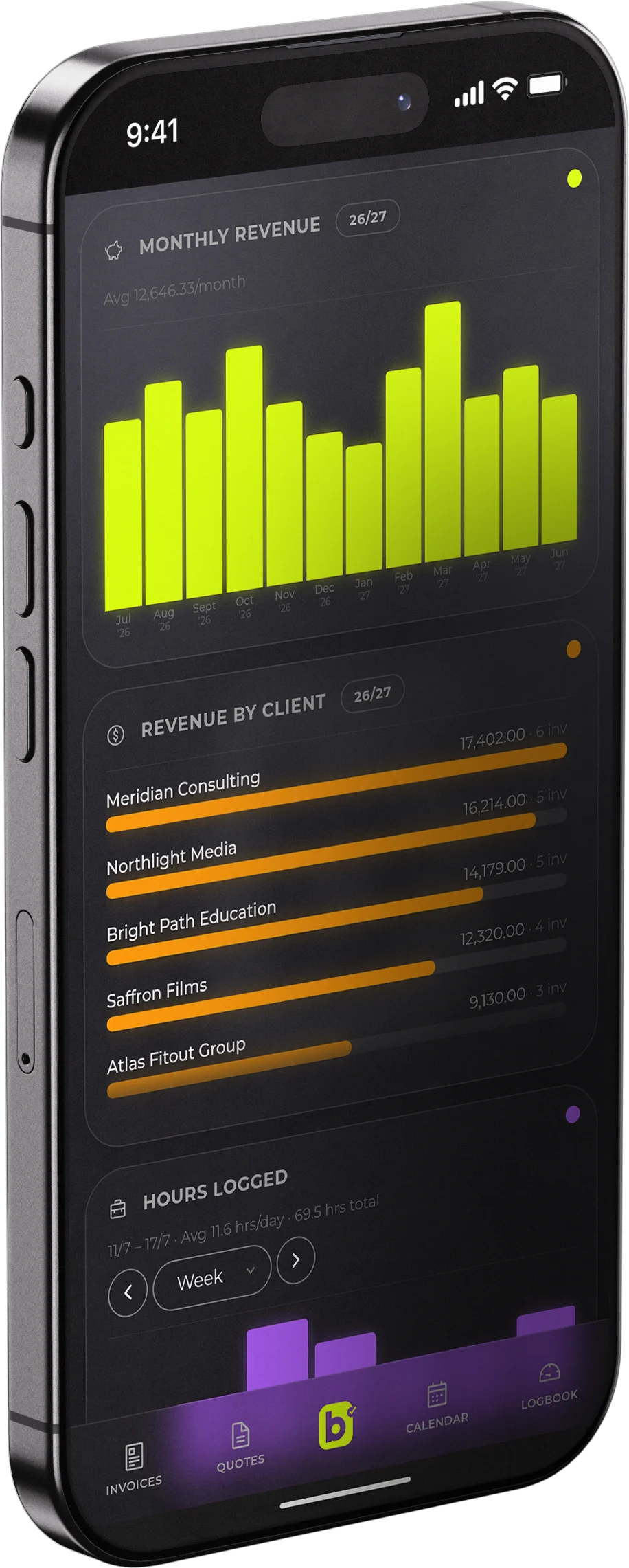
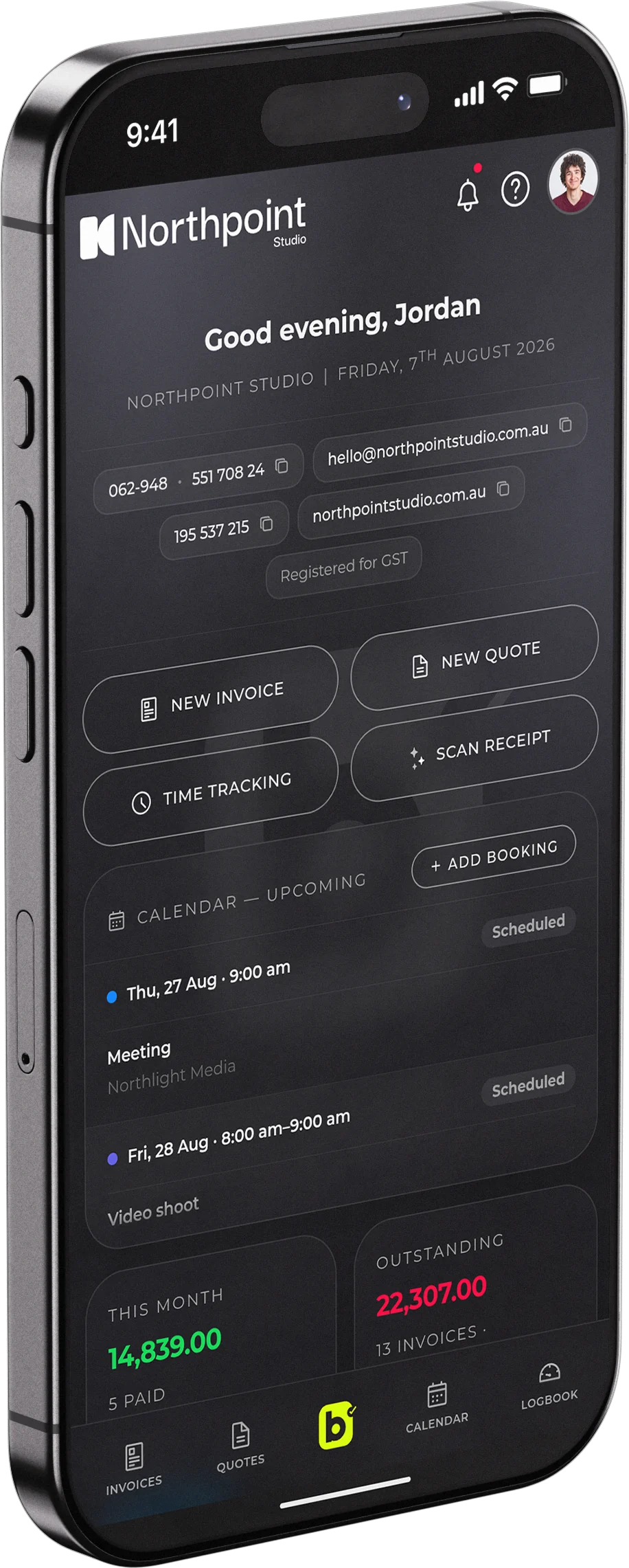
billed on a phone, showing monthly revenue and revenue by client billed on a phone, showing the dashboard with quick actions, calendar and outstanding invoices
A fashion designer on the phone at her laptop, surrounded by sketches and fabric

Designers &
Creatives

Quotes go out fast, deposits land faster, so you can create.

A bike mechanic smiling in his workshop

Trades &
Builders

Invoice from the ute and log every kilometre between jobs.

A filmmaker with a cinema camera on a studio floor

Photo &
Film

Bookings, shoot days and travel, all tracked in one place.

A consultant smiling at her laptop at golden hour

Consultants &
Sole Traders

Track your hours and invoice, minus the spreadsheet.

Who it's for

Built for people who'd rather be doing the work.

Whatever the trade or craft, the paperwork is the same job — billed just makes it quick.

See it in action

Your whole business, at a glance.

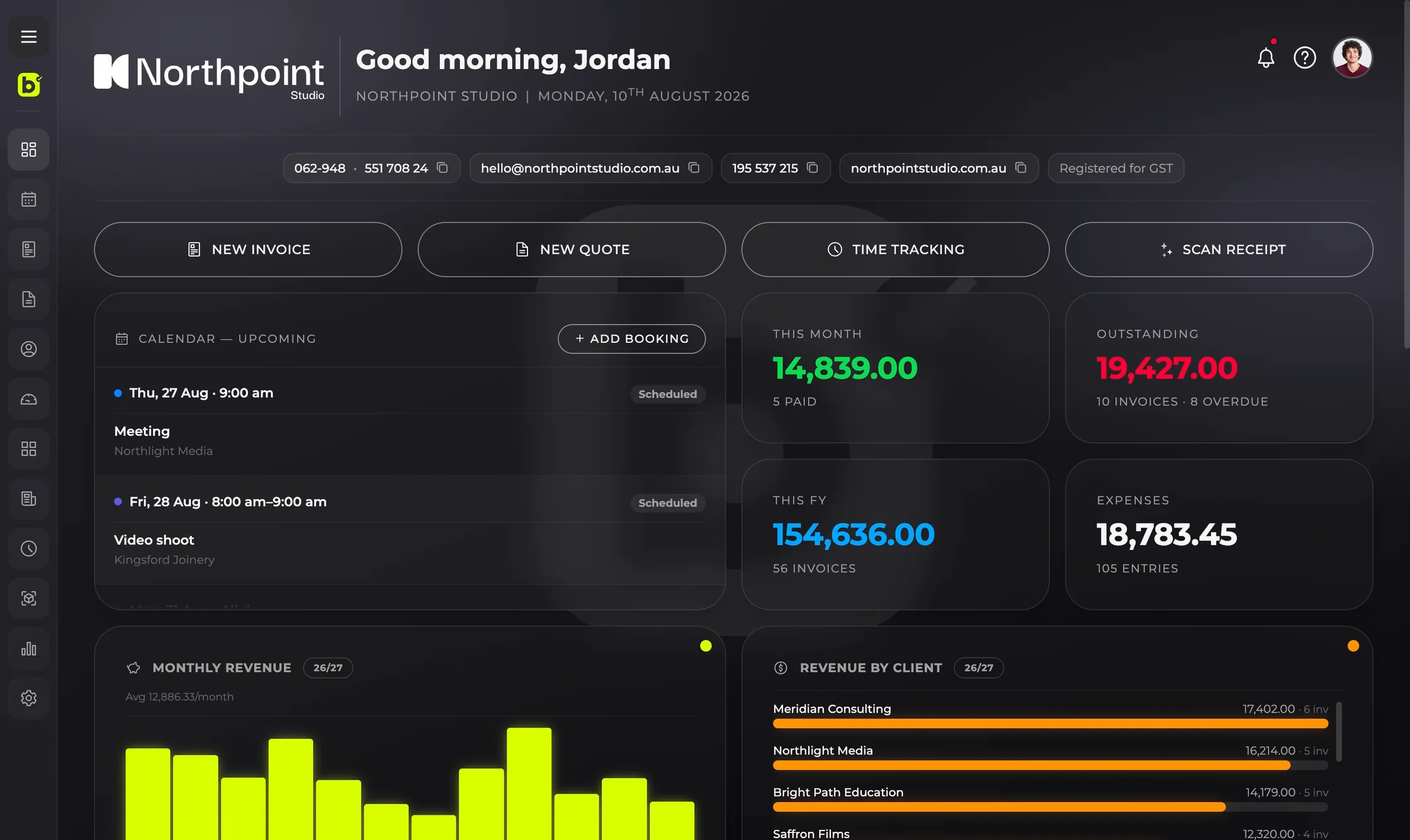
The billed dashboard: greeting, quick actions, upcoming calendar, revenue and outstanding invoices
Dashboard — Revenue, bookings and what is outstanding, the moment you log in.
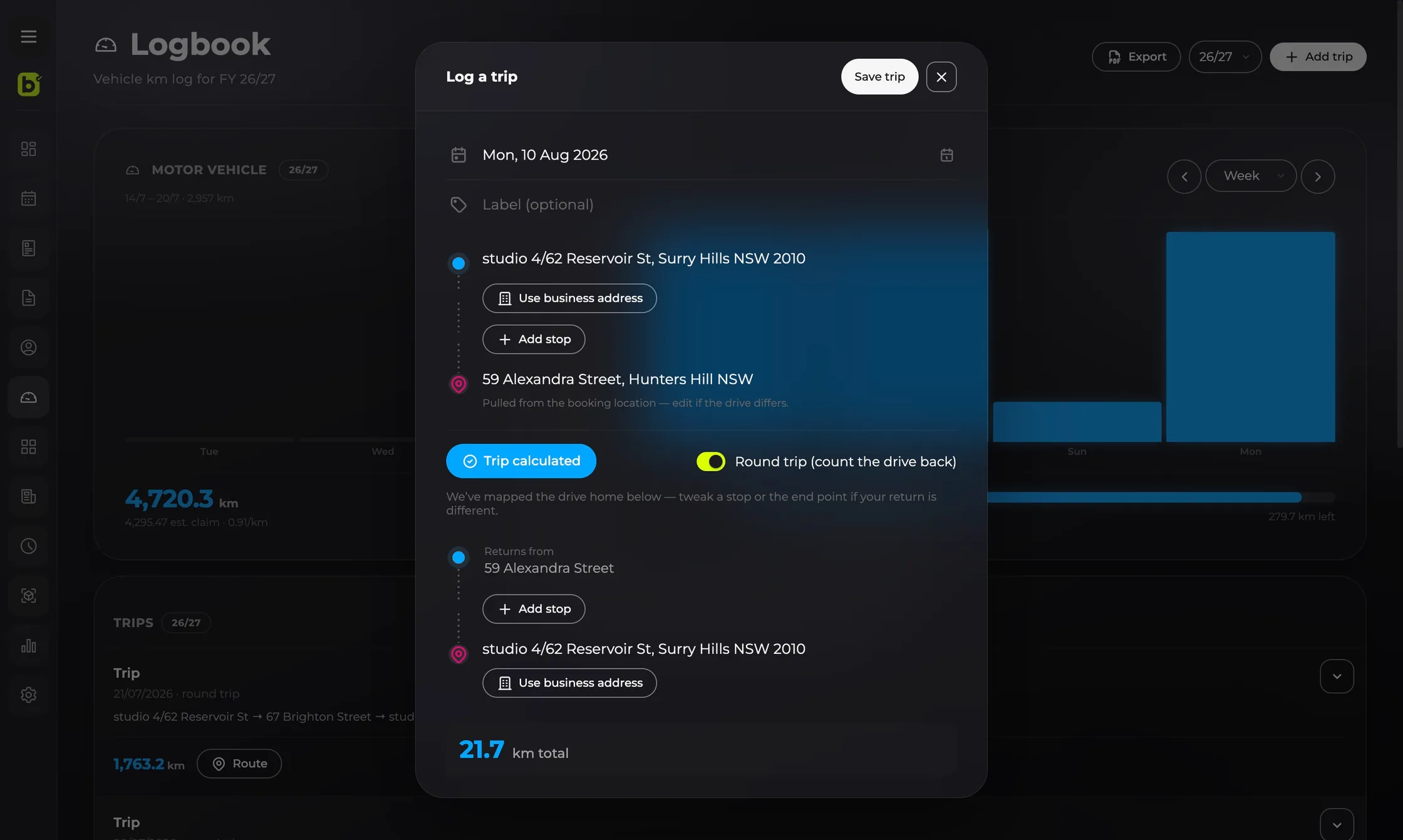
The billed vehicle logbook: a trip being logged with start, stops and destination, a round-trip toggle and the calculated kilometres
Vehicle logbook — Log a trip end to end and let it work out the kilometres, round trip included.
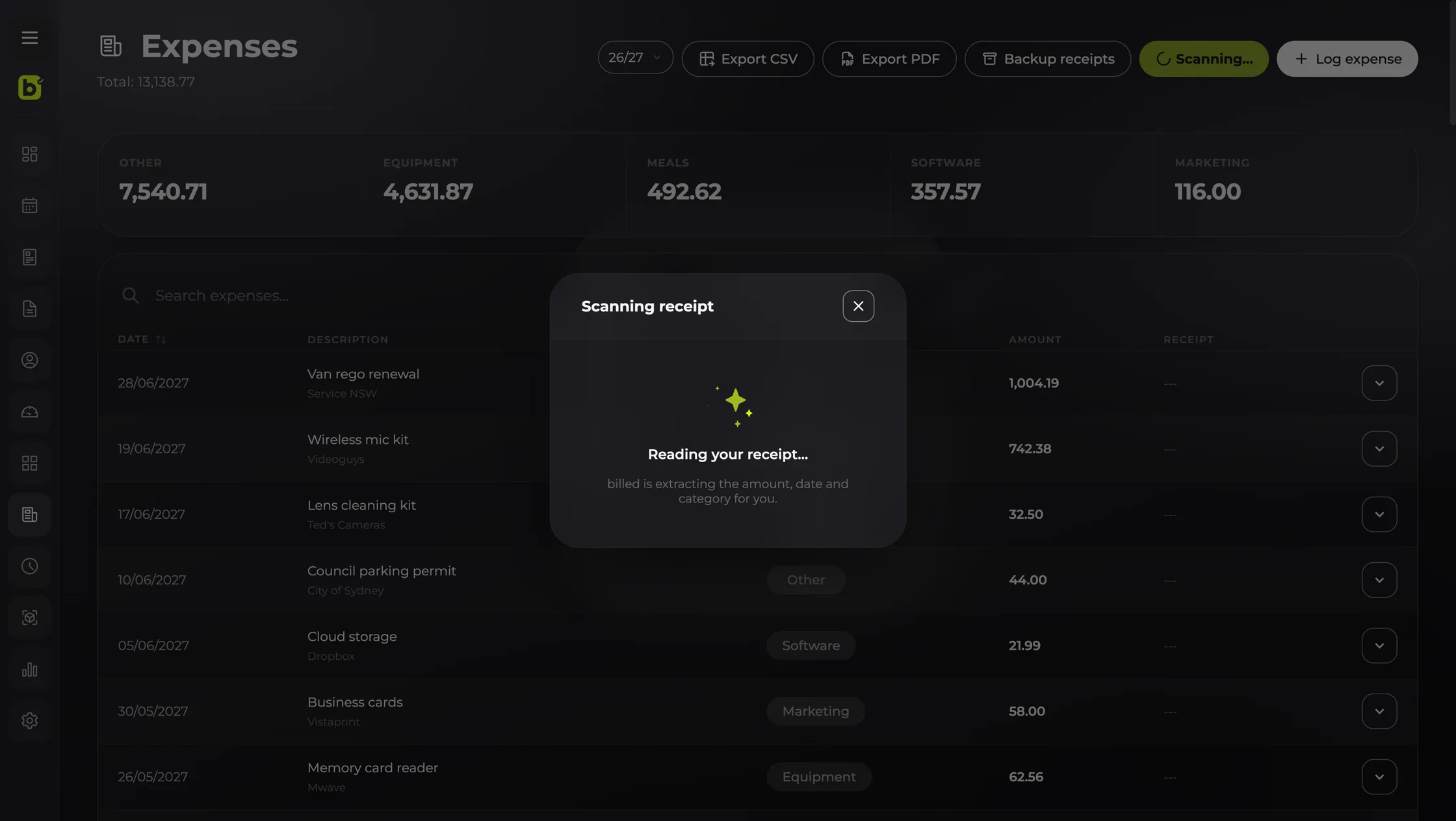
The billed expenses screen while a receipt is being scanned: billed reading the amount, date and category from the photo, with expense totals by category above
Scan a receipt — Photograph it and billed reads the amount, date and category for you.
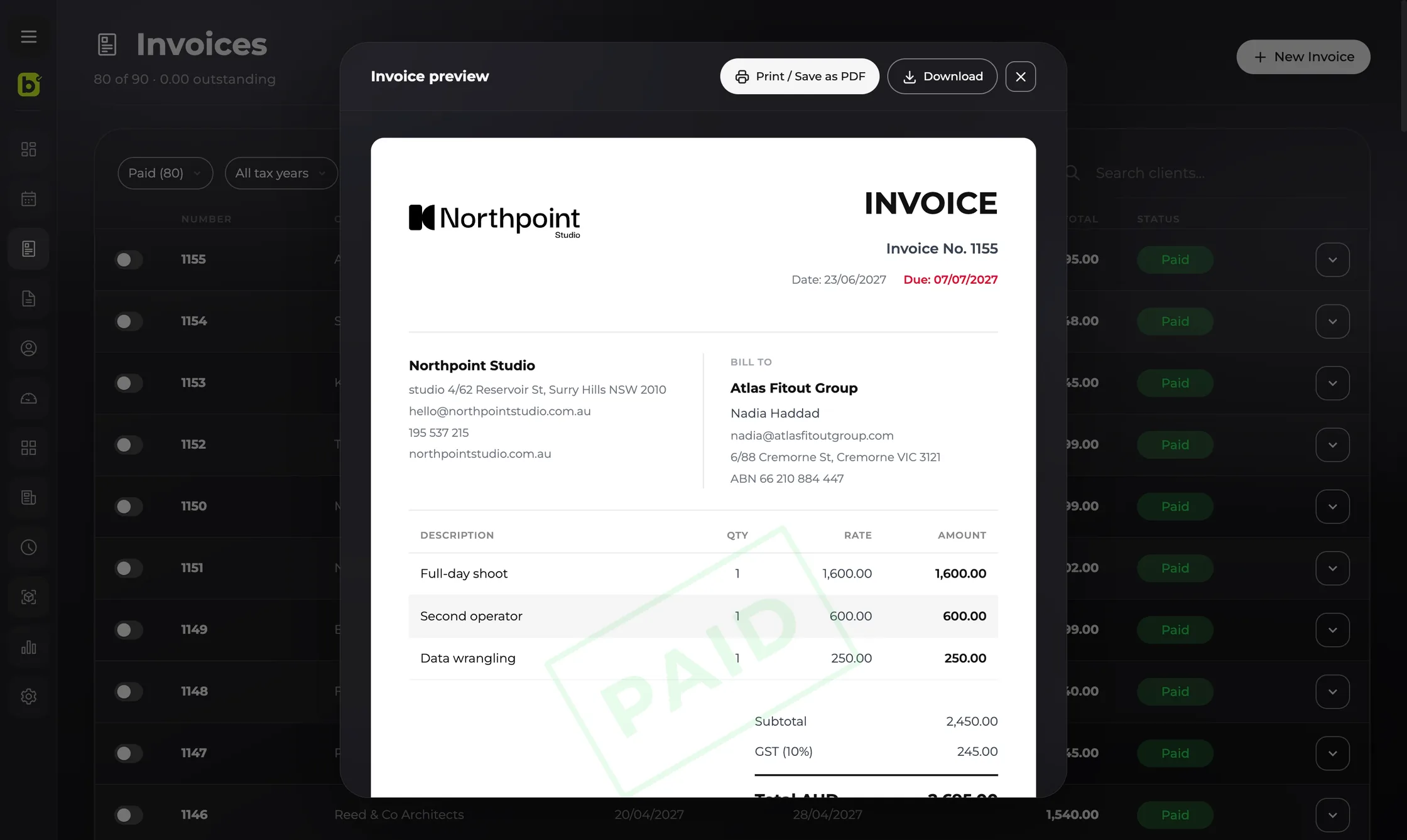
An invoice preview in billed, showing a branded PDF with line items, GST and the total in Australian dollars
Invoices — Preview the PDF your client will see, then send or download it.
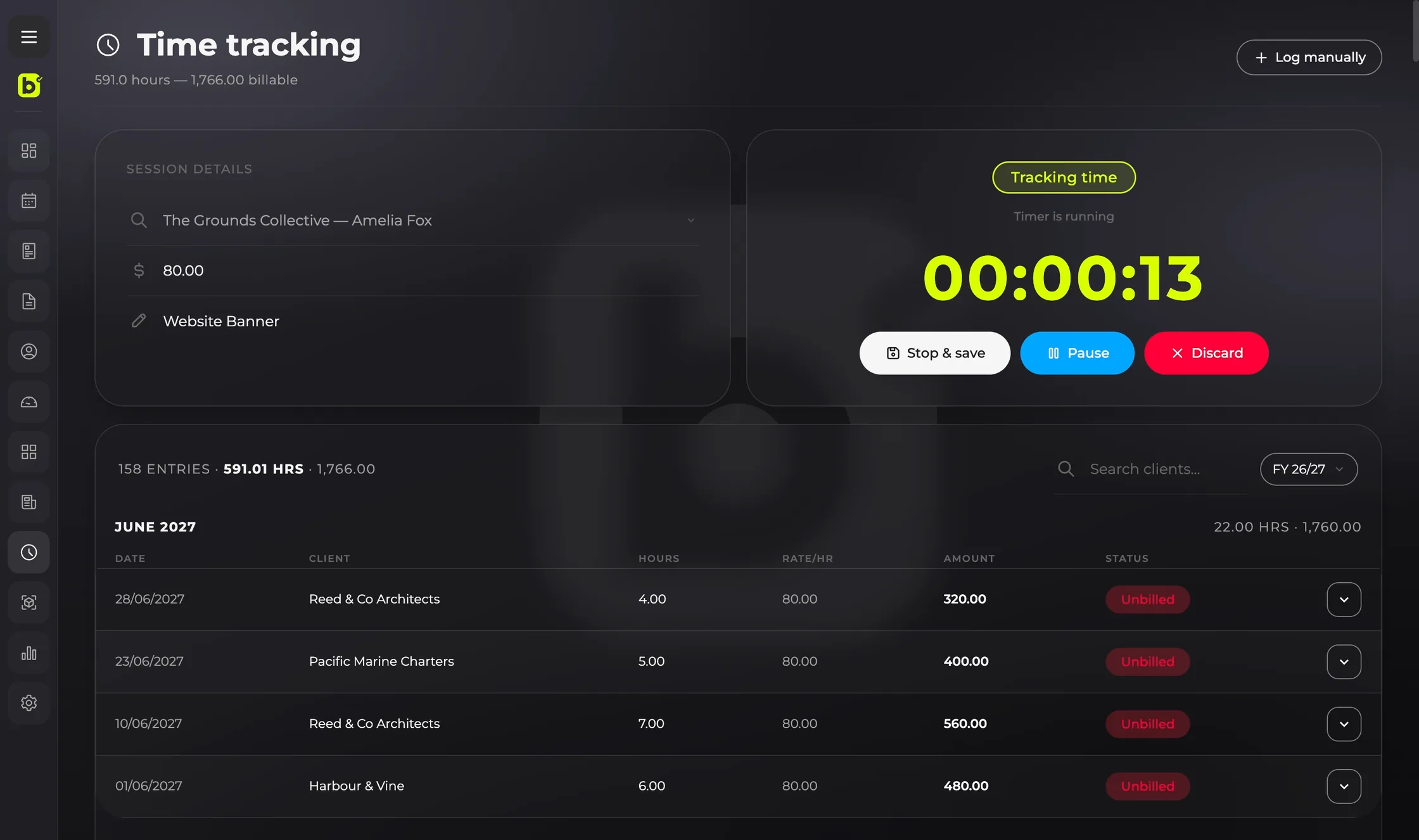
The billed time tracking screen: a running timer, session details and a list of logged entries
Time tracking — Run a timer against a client, then bill the hours without retyping them.
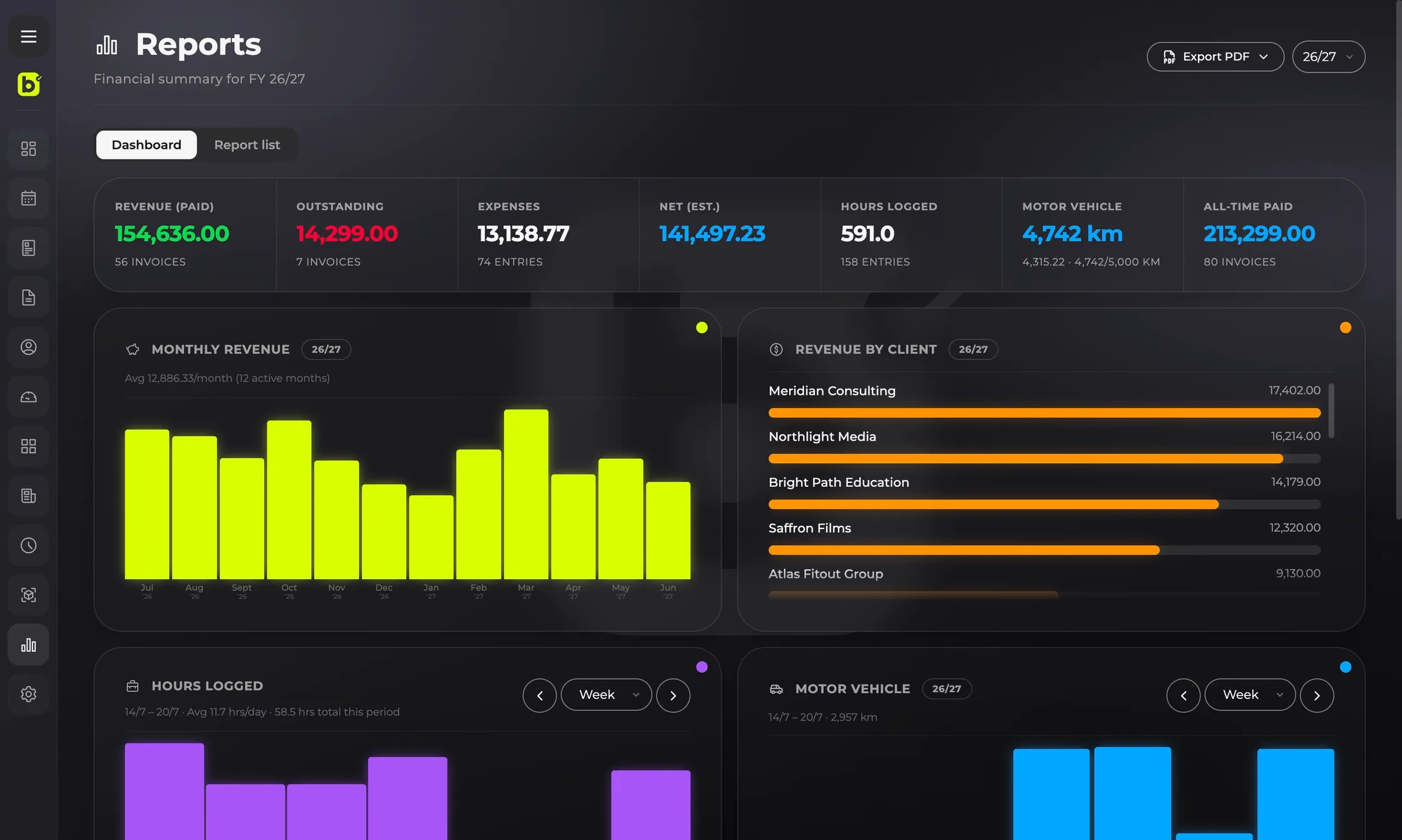
The billed reports screen: financial-year totals, monthly revenue chart and revenue by client
Reports — Revenue, expenses, hours and kilometres summarised for the financial year.
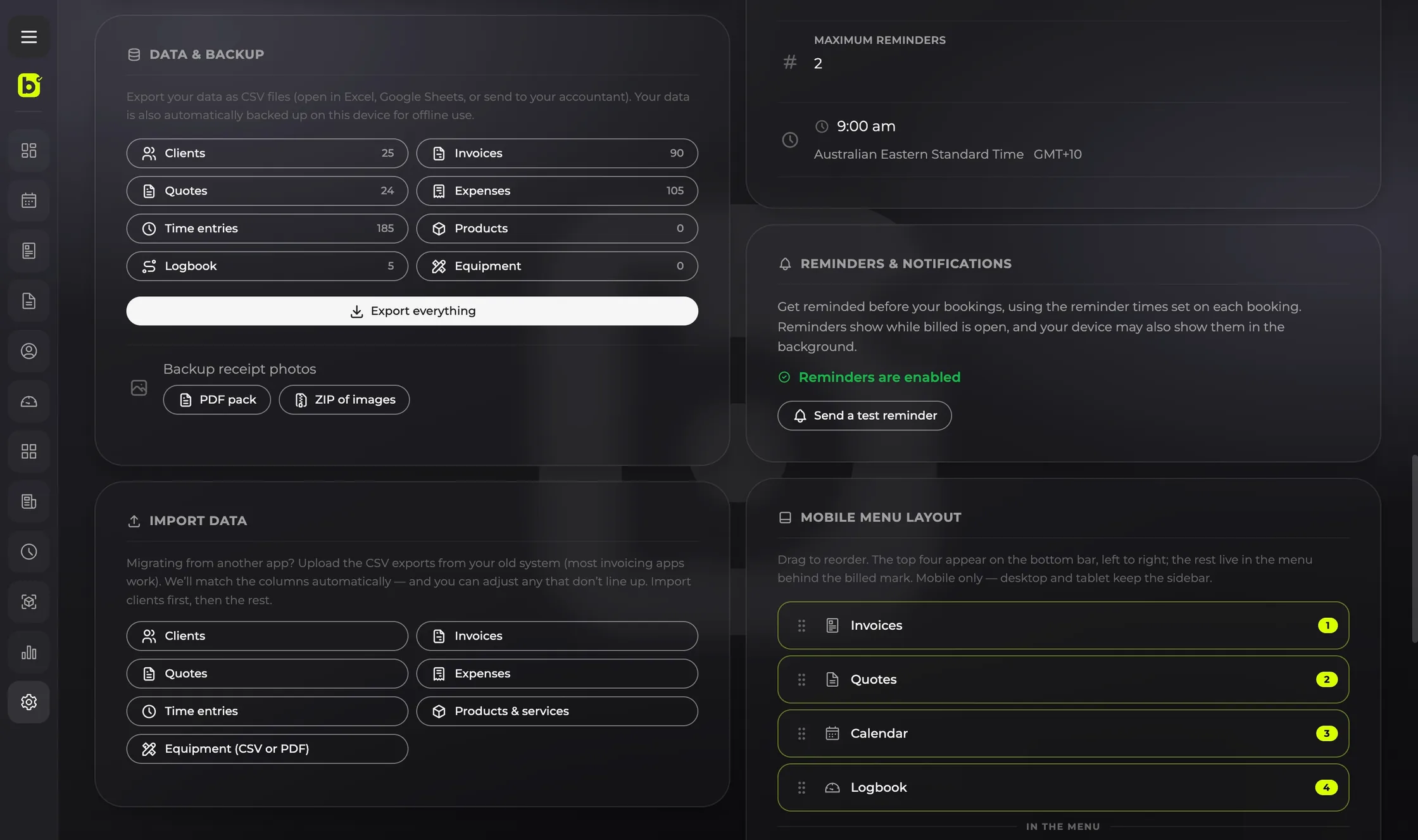
The billed data and backup screen: export counts for clients, invoices, quotes, expenses, time entries and logbook, backup options for receipt photos, and CSV import for migrating from another app
Data & backup — Export everything to CSV, back up your receipt photos, or import your history from another app.

Features

Everything you need to bill,
in one place.

No tiers to compare, no add-ons to buy. Every tool below is included from day one.

Invoices & quotes

Create, send and track invoices and quotes. Add deposits, mark them paid, share a clean PDF in a tap.

Time tracking

Track billable hours with a live timer, then drop them onto an invoice.

Vehicle logbook

Record trips and kilometres for your tax claim, with a running cap and estimate.

Clients & CSV import

Keep every client in one place. Moving from another tool? Bring your whole list across in minutes.

Export & backup

Export everything to CSV whenever you like, and back up your receipts as a PDF pack or a ZIP of the originals.

Expenses & receipts

Snap a photo of the receipt and billed reads the details for you — nothing to type.

Calendar & bookings

See your jobs on a calendar and turn any booking straight into an invoice.

Reports & dashboard

See revenue, hours and outstanding invoices on a live dashboard, and export the numbers anytime.

Products & services

Save your standard rates once — per hour, day or project — and drop them onto an invoice in a click.

Equipment

Keep an inventory of your gear and build a packing list for each job, so nothing gets left behind.

Scheduled sending

Write an invoice now and have it emailed Monday at 9am — billed sends it for you, app closed or not.

Overdue reminders

Switch reminders on for the invoices you choose, and billed chases them politely until they’re paid.

Invoices & quotes

Your invoice should look as sharp as your work.

Still building invoices in a spreadsheet or a Word doc? You do great work — your invoice should say so. billed turns it into a clean, branded PDF in seconds, with deposits and due dates sorted, so you look the part and get paid faster.

  • Deposits, due dates and payment terms
  • One-tap PDF, ready to send
  • Status tracking from sent to paid
A billed invoice open on a laptop, ready to send as a clean branded PDF

On the road

Every kilometre, ready for tax time.

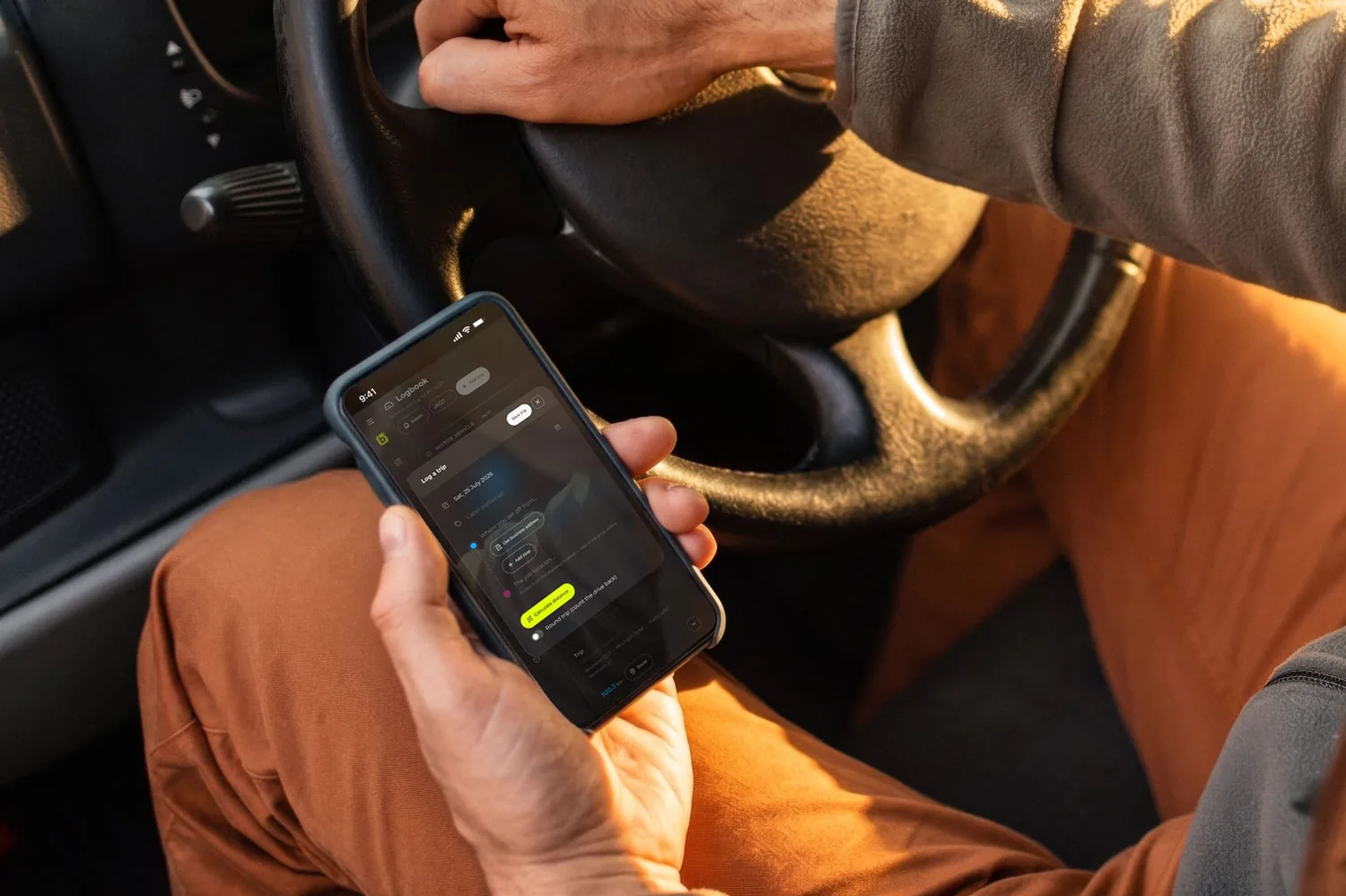
Log trips as you go and billed keeps a running total against your cap, with an estimated claim — so the logbook is done before the financial year ends.

  • Round trips and one-ways
  • Running km cap and estimate
  • Export for your accountant
A driver in the front seat logging a trip in billed on their phone, one hand still on the steering wheel

Anywhere you work

Phone, tablet, desktop — install it like an app.

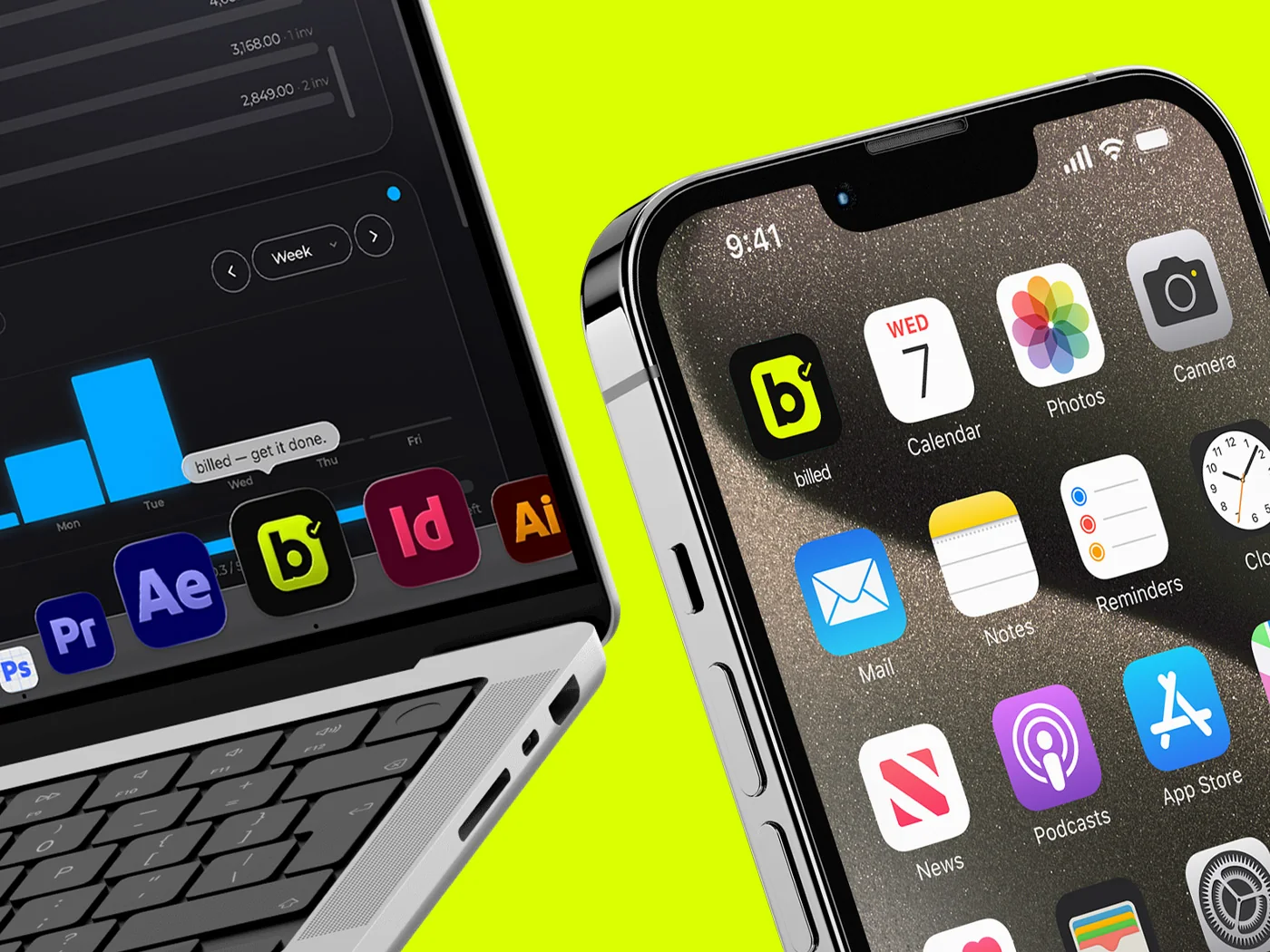
billed runs in any modern browser, then installs to your dock or home screen. It opens like a native app and launches straight into your work — nothing to download, no app store, no updates to chase.

  • Install to your Mac dock or Windows taskbar
  • Add to the home screen on phone and tablet
  • Offline, your data is still there to view and export
billed installed as an app on a MacBook, iPhone and iPad, showing the dashboard, revenue charts and an invoice preview

Make it yours

Four themes. Pick the one
you like.

Modern brings frosted glass and depth. Minimal strips it back to flat, quiet surfaces. Tap one — this whole page switches with it.

Tap a theme to preview it right here — it's the same switch you get inside the app.

How it works

Sending your first invoice takes minutes.

STEP 01

Create your account

Sign up with your email — no card needed to start your 14-day trial.

STEP 02

Add your business

Your logo, ABN and payment terms. A quick wizard sets you up.

STEP 03

Send your first invoice

Add a client, build the invoice, and send it. That's it — get it done.

Pricing

One price. Everything in.

No tiers, no add-ons, no surprises at tax time.

A$10 / month
Flat rate · everything included
  • Unlimited invoices, quotes, clients and expenses
  • Time tracking, vehicle logbook, reports and dashboard
  • 14-day free trial — no card required
  • After the trial — the account simply pauses, and your data stays yours
  • Cancel anytime — from your settings, in a couple of taps
Start your free trial

Export your data anytime — even after you cancel.

Why billed

Built to be fair, and built for here.

One flat price

Everything's included for A$10 a month. No feature you need is locked behind a higher tier.

Your data stays yours

Export everything whenever you like — even after you cancel. No lock-in, ever.

The whole job, one app

Quotes, invoices, expenses, time and kilometres in one place — not four tools that don't talk to each other.

Made for Australia

GST, the financial year, and a vehicle logbook that fits how you actually claim.

Switching is easy

Import your clients, quotes, invoices and past financial years from a CSV — your whole history comes across.

Your currency, your language

Work across borders — currencies and tax settings that follow your country, and the app in four languages.

Questions

Good to know.

Do I need a card to start the trial?

No. The 14-day free trial starts without a card — add one only when you decide to keep going.

Can I export my data?

Yes, anytime — your clients, invoices, expenses, time entries and receipts. Even after you cancel, your data is yours to take.

Can I import my data from my old system?

Yes. Upload the CSV exports from your old system — most invoicing apps will do — and billed matches the columns for you, with a chance to fix any that don’t line up. Clients, quotes, invoices, expenses, time entries, products and services, and equipment all come across — your full history, current and previous financial years included.

I’ve never used an invoicing app — how do I get my clients in?

You can always add clients one at a time. To fill your list faster, billed has a smart import built for exactly this: paste a rough list of names, an email signature or notes off your phone, or add a photo, screenshot or PDF like a business card. It reads them into a review grid for you to check and edit — nothing saves until you confirm, and it skips anyone already in your list.

How do I cancel?

From your account settings — billed opens the Stripe billing portal, where you can cancel in a couple of taps. No phone calls, no retention hoops.

How do my clients pay me?

Put your bank transfer details on the invoice, add a Pay with PayPal link with the amount already filled in, or both. You mark the invoice paid once the money lands.

What devices does it work on?

Any modern browser — phone, tablet or desktop. Install it to your home screen or dock and it opens like a native app. Offline you can still open it and view or export your data, though saving changes needs a connection.

Is it only for Australia?

No. It's built Australian-first — GST, the financial year and ATO logbook rules — but it isn't Australia-only. Set your country and billed adapts the tax, currency and financial year to match: Australia, New Zealand, the UK, Portugal, Spain, Germany and the US are all covered, with the interface in English, Portuguese, Spanish or German.

A woman writing in a notebook, working late at home with billed

Start free today.

Send your first invoice in minutes.

Start your 14-day free trial